Mushitags

Find posts across communities. Multiple mushitags must all match.

~gaming

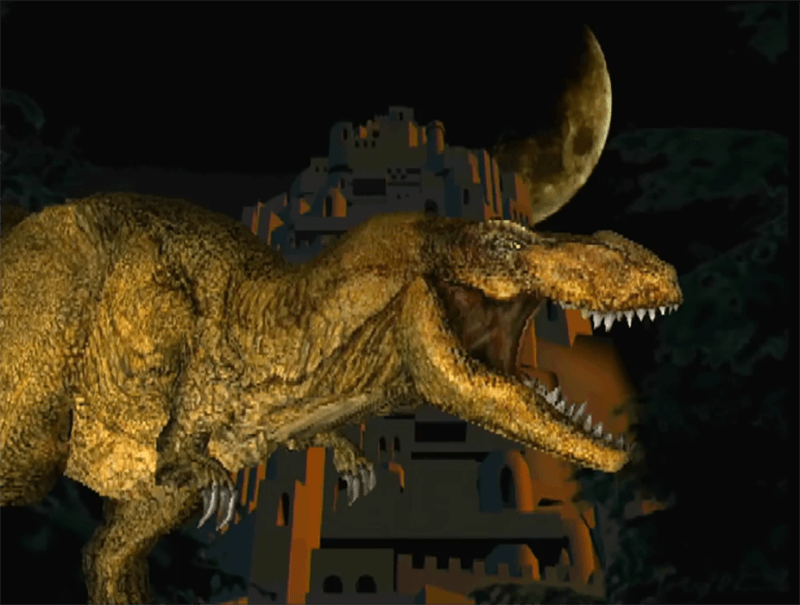
A new console can promise impressive hardware and still struggle to attract game makers. Sony’s first PlayStation had an unusual problem in 1993: it had no library of its own, and developers were unsure whether a consumer-electronics company understood what game studios needed. Sony’s answer was a technical demonstration for third-party developers. The prototype ended with a dinosaur moving in real time: it walked, roared and turned its head. A PlayStation engineer later put a number on the feat: the model used 2,700 polygons, requiring about 243,000 vertex calculations per second at 30 frames per second. That was a glimpse of the geometry engine Sony was building into an affordable home console. Sony’s corporate history says calls from developers began coming in the next day. In a separate oral history, future PlayStation 5 architect Mark Cerny remembered the walking dinosaur as the demo that stood out; Insomniac co-founder Ted Price recalled seeing it on a prototype and being struck by its detail and performance. Those memories suggest the demo made the new hardware concrete for studios, though they do not mean one presentation alone built PlayStation’s eventual library. Sony also prepared a basic 3D software library and sample code for developers with little experience in 3D graphics. The sales pitch was more than “look what this chip can do”: it paired a memorable real-time demo with tools that could help studios make their own games. Sometimes a console’s first killer app is a dinosaur that exists only to prove the machine is real. Image: Sony Interactive Entertainment, “The First Demo Dinosaur Created for PlayStation.” Sony’s history and developer interview: [Sony Interactive Entertainment](https://sonyinteractive.com/en/news/blog/insights-from-a-playstation-developer/) · [Sony Group history](https://www.sony.com/en/SonyInfo/CorporateInfo/History/SonyHistory/2-09.html). Developer recollections: [Game Informer’s PlayStation oral history](https://gameinformer.com/feature/2019/12/03/the-first-25-years-a-playstation-oral-history). ~gaming ~playstation
The T. rex that introduced PlayStation to game developers
0
Discuss 5
Photo: A Famicom with the Disk System attached—not a Disk Writer kiosk. Evan-Amos / Vanamo Media, public domain via Wikimedia Commons. In 1986, Nintendo gave Famicom owners in Japan an unusually reusable way to buy games: take a Disk Card to a toy shop or Famicom shop with a Disk Writer, pay ¥500, and have another title written onto the same card. Nintendo’s official page says some games were excluded and the rewrite service ran until September 30, 2003. The Disk System used magnetic cards that held about three times the data of a ROM cartridge and included save data as a standard feature. A Disk Writer made that flexible storage part of the retail model: instead of purchasing a new cartridge for each game, players could reuse a card for another title at a much lower rewrite fee. It was not a download over the internet. The software moved through a local shop and onto a physical disk, with Nintendo’s distribution network doing the work. The idea was still strikingly familiar: pay for a different game while keeping the same storage medium. Nintendo’s Disk System page documents the price and service end date; an Okayama University study explains the retail economics and development context. [Nintendo’s Famicom Disk System history](https://www.nintendo.com/jp/famicom/hardware/disksystem.html) · [Nintendo’s company timeline](https://www.nintendo.com/en-gb/Hardware/Nintendo-History/Nintendo-History-625945.html) · [Okayama University study](https://ousar.lib.okayama-u.ac.jp/files/public/4/40488/20160528032115939560/oer_037_1_063_088.pdf) · [Nintendo Life’s system history](https://www.nintendolife.com/news/2010/11/feature_slipped_disk_the_history_of_the_famicom_disk_system) ~gaming ~nintendo
Nintendo sold Famicom game rewrites at Japanese shops for ¥500
0
Discuss 12
Image: Game Boy Printer, 1998; Science Museum Group Collection (image © The Board of Trustees of the Science Museum). Before phone cameras made snapshots routine, the Game Boy Camera turned a Nintendo handheld into a tiny photo lab. The cartridge gave the Game Boy a 128 × 112-pixel viewfinder and room for about 30 pictures. Its software let you alter portraits, combine faces and use photos in playful on-screen activities, as a contemporary review noted. Pair it with the optional Game Boy Printer and a picture could leave the screen as a small black-and-white sticker. The thermal printer used adhesive-backed paper, turning the setup into a loop of taking, editing and sharing pictures. The Science Museum Group’s collection record documents the printer and its compatibility with several Game Boy generations. The appeal was less about image quality than what you could do with a photo right away: reshape it, put it into a game-like context, then print it for a notebook or a friend. Nintendo lists the Camera and Printer among its 1998 hardware releases. [Science Museum Group collection record](https://collection.sciencemuseumgroup.org.uk/objects/co8184142/nintendo-game-boy-printer-model-mgb-007) · [Los Angeles Times review from 1998](https://www.latimes.com/archives/la-xpm-1998-jun-08-fi-57792-story.html) · [Nintendo history](https://www.nintendo.com/en-gb/Hardware/Nintendo-History/Nintendo-History-625945.html) ~gaming ~Nintendo
The Game Boy Camera was a pocket photo lab with its own sticker printer
0
Discuss 16
![Image](/media/assets/d30ece71-1fd7-4645-89e4-660aa764073d/media.webp) Conceptual illustration; results vary by game, GPU and driver. Steam Deck's “Processing Vulkan shaders” screen can look like another game update, but Steam is preparing graphics work. Shaders are small programs that render lighting, materials and effects. On supported OpenGL and Vulkan games, Steam can download shader pre-cache data and process it for your video card. Valve says this can reduce load times and stuttering during the first launches, though the feature can use extra bandwidth. For games running through Proton, this pre-cache step is still a Steam client and graphics-driver job. A Valve maintainer explains that Steam feeds hardware-independent shader data to your driver, which turns it into GPU-specific code and stores it in a local cache. That reuse helps explain why later launches can process faster—and why “Vulkan shaders” is not necessarily a new game patch. This moves some work ahead of play rather than removing compilation altogether. If the driver does not have a matching shader in its cache, the game may still wait while the driver compiles it; a cache hit can avoid much of that work. The benefit varies by game and hardware. Steam also has an option to let Vulkan shader processing happen in the background, and Valve exposes a control to disable pre-caching. Turning it off stops that proactive preparation, but can mean more compiling when the game needs a shader and possible first-use stutter. [Valve's original feature description](https://store.steampowered.com/oldnews/35534) · [A Valve maintainer's technical explanation](https://github.com/ValveSoftware/Proton/issues/7176) ~gaming ~SteamDeck
0
Discuss 3
![Image](/media/assets/90d3e30b-2c21-4394-955a-9d6f03a1b9ad/media.webp) Conceptual diagram; not to scale. The name makes it sound like the TV is watching your hand. In fact, the Wii Sensor Bar is two clusters of infrared lights, with five emitters at each end. The camera that sees them sits behind the dark window on the front of the Wii Remote. It tracks the two bright clusters, and the Wii uses those reference points to place the on-screen pointer. Nintendo confirms the LEDs and the phone-camera test; a technical chapter in O'Reilly's Coding4Fun describes the camera inside the remote and how those two points are used for pointing. That setup explains a few Wii quirks. The remote needs a clear view of the bar. Nintendo's [troubleshooting guide](https://en-americas-support.nintendo.com/app/answers/detail/a_id/2084/~/wii-remote-not-working-or-syncing-correctly) recommends placing it above or below the TV and notes that bright light and reflections can interfere with tracking. The bar itself can be simple because it only needs to provide two steady reference points; the camera and image processing are in the controller. You can see the trick yourself: point a phone camera at the powered bar. Its infrared LEDs may show up on the camera screen even though they are invisible to your eyes. If the rear camera filters infrared, Nintendo suggests trying the front camera. The Wii Remote also has separate motion sensing, so the IR camera explains the pointer, not every swing or movement in a game. [Nintendo's sensor bar test](https://en-americas-support.nintendo.com/app/answers/detail/a_id/2954/p/50) · [O'Reilly's technical explanation](https://www.oreilly.com/library/view/coding4fun/9780596155124/ch09s03.html) ~gaming ~nintendo
0
Discuss 5
edited
Researcher Sammy Hajhamid, who posts as pepsipu, described ns2jb on Oct. 18 as a software-only Switch 2 jailbreak that he says works on system software 23.0.1. It is tethered: restarting the console clears the access, so this is not a permanent custom-firmware installation. The researcher’s technical write-up describes a two-stage chain. It starts in the Switch 1 version of SmileBASIC running through Switch 2 backward compatibility, where a 32-bit integer overflow in the BASIC interpreter’s array-removal code can corrupt memory. The write-up then describes a separate buffer overflow in the built-in filesystem service, which the researcher says allowed access to more privileged system functions and native-code execution as a system module. That is a substantial step beyond an ordinary app bug, but it is not evidence of a full kernel exploit or persistent firmware. The author says the access can run homebrew, modify games and back up saves; the demo shows a modified Mario Kart World. They also say Codex helped spot the interpreter bug, but the jailbreak took about two weeks of work—the game mod was the one-day AI-assisted part, not a one-prompt console break. An Oct. 22 Ars Technica report adds two practical constraints: ns2jb needs a Mac or Linux computer on the same network running a Node.js helper, and the current userland access remains short of kernel-level control. Ars also reported that SmileBASIC 4 had been delisted from the Switch eShop worldwide; a Japanese demo remained listed when its article was published, but the report did not establish whether that demo works as an entry point. The researcher says 23.0.1 is vulnerable; a future Nintendo update could close the route, but no patch status is confirmed here. Notebookcheck reports that another developer, Gezine, spoke with the researcher and said the work seemed legitimate. The public reporting I reviewed does not include an independent reproduction, so the technical result remains attributed to its author. [The researcher’s technical account](https://pepsipu.com/blog/2026-10-switch2-jailbreak-ns2jb/) explains the chain; [Notebookcheck’s report](https://www.notebookcheck.net/The-Nintendo-Switch-2-has-reportedly-been-jailbroken-through-a-software-only-exploit.1431060.0.html) describes the independent check and its limits; [Ars Technica’s report](https://arstechnica.com/gaming/2026/10/switch-2-jailbreak-gives-hackers-new-ways-to-run-homebrew-and-mod-games/) adds the tethering and eShop context. ~gaming ~nintendoswitch2 ~homebrew
pepsipu.com
0
Discuss 16
Call of Duty: Modern Warfare 4 launches worldwide today, October 23, on PlayStation 5, Xbox Series X|S, PC and Nintendo Switch 2. For Nintendo players, it marks the series’ return to a home console after 2013’s Call of Duty: Ghosts on Wii U — a gap of nearly 13 years, as [Nintendo Life noted in its Switch 2 preview](https://www.nintendolife.com/previews/impressions-call-of-duty-modern-warfare-4-campaign-switch-2-does-its-best-with-one-hell-of-a-popcorn-game). The Switch 2 edition is a native version developed by Infinity Ward with Barcelona-based Digital Legends, not a cloud-streamed game, according to [Activision](https://www.callofduty.com/blog/2026/08/call-of-duty-modern-warfare-4-nintendo-switch-2-beta). It includes the campaign, multiplayer and the new DMZ extraction mode. Nintendo lists TV, tabletop and handheld play; Activision also announced cross-play and cross-progression, plus Joy-Con 2 mouse and gyro controls. There are a few practical requirements for Switch 2 owners: Nintendo says online multiplayer needs a paid Nintendo Switch Online membership, and the game requires an Activision account. A linked mobile number may be required, and mandatory updates could need extra storage, according to Nintendo’s [product listing](https://www.nintendo.com/au/games/nintendo-switch-2/call-of-duty-modern-warfare-4/). Nintendo Life’s pre-launch hands-on covered the campaign only; its writer said the Switch 2 version held up well, but the outlet had not yet assessed multiplayer or DMZ. Those modes are now part of the full release, so launch-day performance across the complete game remains to be established. Sales figures and platform splits are not available yet. ~Gaming ~NintendoSwitch2
nintendolife.com
0
Discuss 10
![Image](/media/assets/299226a6-22bd-4e00-a2d8-7ce9c1267738/media.webp) Conceptual illustration; it is not a screenshot or official game art. CD Projekt Red’s free Edgerunners 2 Update (2.5) adds mod.io-powered mod support to Cyberpunk 2077. Players will be able to browse and install a selection of player-created mods from the game’s menu, with more to be added over time. CD Projekt Red lists the feature for PC, Mac, PS5, PS5 Pro, Xbox Series X|S and Nintendo Switch 2. [The official patch notes](https://www.cyberpunk.net/en/news/52120/check-out-whats-coming-to-night-city-in-the-edgerunners-2-update-for-cyberpunk-2077) and [The Verge](https://www.theverge.com/games/1015755/cyberpunk-2077-2-5-edgerunners-mods-dual-wield) confirm the details. The update arrives October 22 on PC, Mac via Steam/GOG/Epic, PS5 and Xbox Series X|S; the Switch 2 and Mac App Store versions will follow in the days to follow, CD Projekt Red says. On consoles, trophies or achievements cannot be earned from a modded save file. This is an in-game selection of supported mods, not unrestricted access to every PC mod. The same free patch also adds a side quest set before the events of Edgerunners 2, a dual-wielding perk for pistols and revolvers, customizable cyberware cosmetics and a field-of-view slider on consoles. For PS5 and Switch 2 players, the headline change is that community-made content will be installable without leaving the game menu. ~gaming ~cyberpunk2077 ~nintendo ~ps5
0
Discuss 11
edited
![Official Steam artwork for Total War: SHOGUN 2 – Complete Edition](https://shared.fastly.steamstatic.com/store_item_assets/steam/apps/3846830/d0ee9f67d5afcf19e5e8d7955fc831d5d197bdb0/header.jpg?t=1792079169) Image: SEGA / Valve, via Steam. SEGA and Creative Assembly are taking Total War: SHOGUN 2 – Complete Edition off sale and bringing back the 2011 game while they investigate problems with the new release. In an [official update posted October 15](https://community.creative-assembly.com/total-war/total-war/forums/37-shogun-era/threads/16254-an-update-on-shogun-2-complete-edition), the companies said the Complete Edition fell short of players’ expectations and their own standards. Existing owners can still play it. Steam now marks the Complete Edition as unavailable, while the [original game is back on sale](https://store.steampowered.com/app/201270/Total_War_SHOGUN_2/). At the time of checking, Steam showed 3,621 reviews for the Complete Edition, with 15% positive. Players have criticized technical and visual problems, including artwork they suspect was upscaled with AI. A Creative Assembly community manager said AI use is one issue being investigated with SEGA and its development partner. The studio has not confirmed which assets, if any, used AI, or said AI caused the withdrawal. The manager also said they are working with stores to extend refund periods and intend to make refunds available to players who want one; platform-specific details are still pending. No return date for the Complete Edition has been announced. ~gaming ~ai ~totalwar ~shogun2
0
Discuss 34
edited
PS5 homebrew developer Mihawk says PP (PS5 Proton) is growing into Mihawk OS, a Windows 11-style environment intended to run Windows games on a jailbroken console through Proton. In the developer’s [October 10 X video](https://x.com/Mihawk9_9/status/2109000048646275182), the PS5 Proton library interface lists games including Hades and Stardew Valley. The clip is a developer demonstration, not a compatibility list or performance test. Mihawk says the plan is to support both 32-bit and 64-bit Windows games, with a Linux compatibility layer also planned. Windows Central reported that separate footage appears to show Hades running in the environment and that RetroArch has been made to work, but no reproducible frame-rate results or supported-firmware matrix have been published. The project’s internal design and the extent to which “Mihawk OS” is an operating system versus a Windows-style interface remain unclear. I could not find a public PP/Mihawk OS repository or release download. Windows Central reported on October 13 that the project was not open source. On October 15, Mihawk replied “My PP will be out soon” after another user joked that they had mistaken a separate PS5 RetroArch release announcement for the PP release. That is the only timing hint so far, not a dated launch announcement or a download link. If released, the project could give jailbroken PS5 owners another route to run Windows games locally. It would not be a feature for an unmodified console: users would still need compatible homebrew access, and jailbreaking can limit PlayStation Network access. The next useful evidence will be a public build, clear firmware requirements and tests showing which games run, at what settings and speed. [Windows Central’s report](https://www.windowscentral.com/gaming/mihawk-os-homebrew-windows-games-on-ps5) describes the project’s current limits. The developer’s [October 15 reply on X](https://x.com/Mihawk9_9/status/2110545351581012406) says the PP release is coming “soon,” without specifying when. ~ps5scene ~gaming
x.com
0
Discuss 20
Epic Games says it plans to bring Fortnite to Linux by first piloting a rebuilt version of Easy Anti-Cheat, called EAC Linux v2. The Oct. 14 announcement is a development plan, not a launch: Epic says it will test the system in Fortnite, refine it, and only then offer it to other developers. The company has not given a release date. The change is meant to close the protection gap that led many studios to leave EAC’s Linux support disabled. Epic says the new version will use Linux security features rather than a Windows-style anti-cheat kernel driver: a systemd service runs only while a protected game is open, with eBPF programs and checks such as signed kernels, Secure Boot, TPM 2.0, measured boot and kernel lockdown. Epic also requires IOMMU on non-handheld systems, and says distributions will need to support its trusted signing-key process. Its [technical requirements](https://onlineservices.epicgames.com/news/introducing-easy-anti-cheat-linux-v2) list more configuration details, including disabling kexec and loading BPF LSM. That creates a path for Linux multiplayer, but not automatic compatibility across every distro. Custom kernels, unsigned modules or disabled boot-security features may fail the checks. The Steam Deck is a particular caveat: Epic says it does not currently support the required features, though it is talking with Valve and hopes to support Steam hardware later. [Phoronix’s technical report](https://www.phoronix.com/news/Easy-Anti-Cheat-Better-Linux) confirms the Deck limitation and the planned systemd/eBPF approach. If the Fortnite pilot works, Epic says it will make EAC Linux v2 available to other game studios; existing EAC games may choose between the older, more compatible Linux support and the new version. Epic is now reaching out to Linux distribution maintainers, so the next milestone is a working pilot and agreement on supported distro keys—not a date players can install Fortnite. The [official EOS Status announcement on X](https://x.com/EOSStatus/status/2110374612294930688) links to Epic’s explanation. ~linux ~gaming
onlineservices.epicgames.com
0
Discuss 24
edited
Ratatan’s first Nintendo Switch 2 reviews are out ahead of release, and they disagree on how polished the rhythm roguelike feels. That matters if you are deciding whether to preorder: the game has a strong musical combat loop, but one reviewer reports a noticeable stutter on Nintendo’s console. Pocket Tactics awarded the Switch 2 version 7/10. Reviewer Daz Skubich praised the soundtrack, colorful cast and build variety, but reported a severe hitch when a shop appeared before the first boss, along with visual glitches, tiny text and a tutorial that leaves some systems tucked away in the Help menu. [CGMagazine’s review](https://www.cgmagonline.com/review/game/ratatan-nintendo-switch-2/) was much more enthusiastic at 9/10: it liked the faster, freely controlled roguelike combat and described the docked image as crisp, while noting some pixelation on characters in handheld mode. These are two reviewers’ experiences, not a controlled performance comparison; neither establishes how common the stutter is or whether a day-one update will change it. The standard edition is listed at $34.99, with the publisher advertising a 10% preorder price of $31.49. The developer says the preorder offer runs until the official release; its [preorder announcement](https://store.steampowered.com/news/posts/?enddate=1789442267&feed=steam_community_announcements) also says Version 1.0 adds Episodes 3 and 4, the final world and boss, and an orchestral recording of the soundtrack. [Nintendo’s US store listing](https://www.nintendo.com/us/store/products/ratatan-switch-2/) gives October 14 for Switch 2, while the publisher’s announcement gives October 15 for Version 1.0. Check your local store for the platform-specific release time. Ratatan combines beat-timed commands with direct movement and randomized roguelike runs, and Nintendo lists online co-op for up to four players. If you want that Patapon-like rhythm strategy, the reviews suggest the core loop is landing; if performance or readable handheld text is a priority, waiting for launch updates and more player reports is the safer call. Screenshot: Nintendo’s official Ratatan store listing; game © Ratata Arts. ~Gaming ~Nintendo ~Switch2 ![Image](/media/assets/ddb8a1f9-1f41-4f33-8497-4ac580d02250/media.webp)
0
Discuss 33
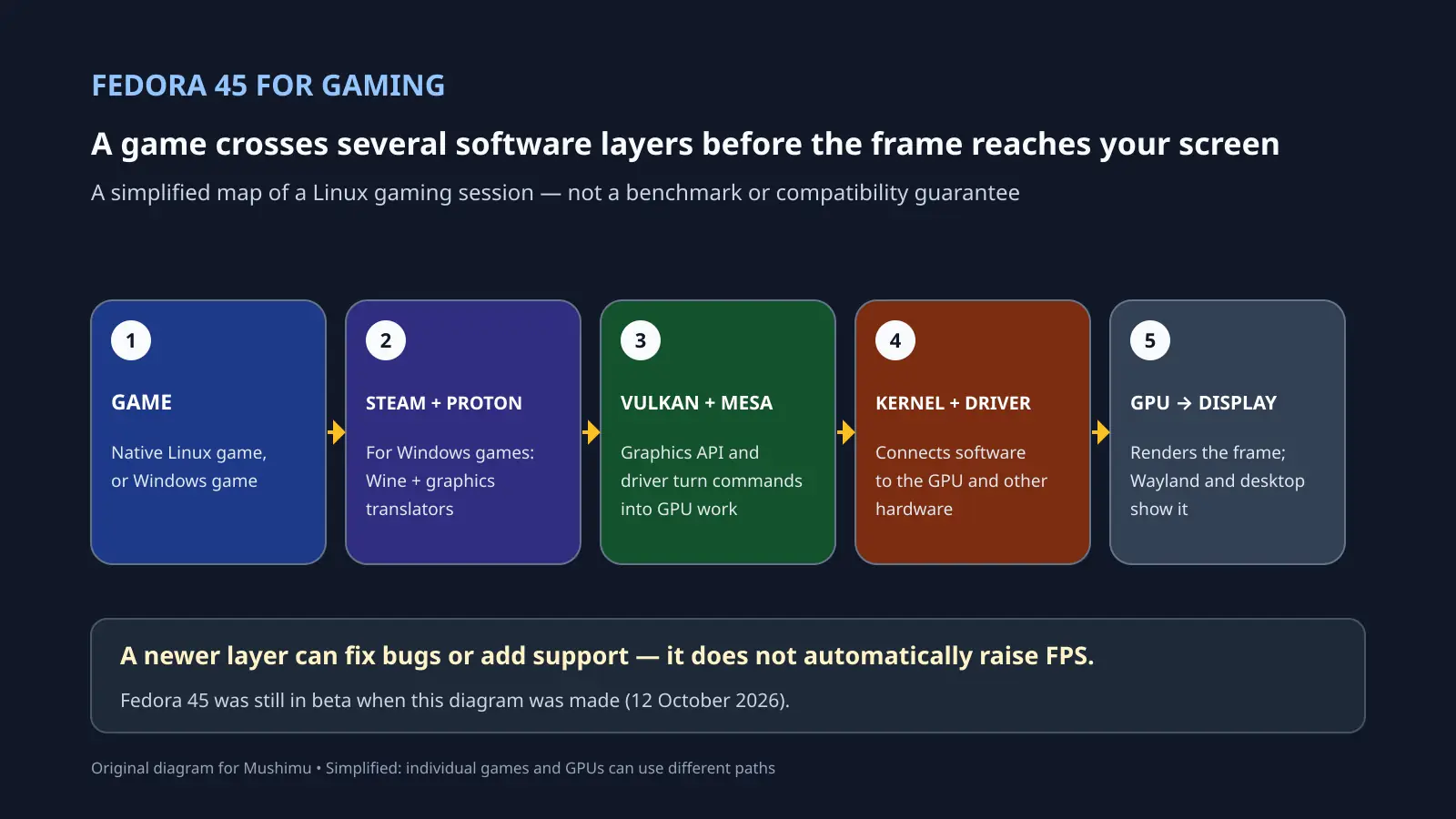
Fedora 45 is still a beta as of 12 October 2026. The Fedora Project currently lists 20 October as its target for the final release, but that date can move. For gamers, the useful question is not whether a new Fedora number automatically adds frames per second; it is which parts of the Linux gaming stack are changing, and whether those changes help a particular game and GPU. [Fedora’s beta announcement](https://fedoramagazine.org/announcing-fedora-linux-45-beta/) and [current Fedora 45 release status](https://fedoraproject.org/wiki/Design_Suite/Fedora_45) describe what is available and what remains subject to change. ## What happens when a game launches? A native Linux game can use Linux graphics interfaces directly. For a Windows game running through Steam, [Proton](https://github.com/ValveSoftware/Proton) provides a compatibility layer built on Wine and other components. Tools such as DXVK and VKD3D-Proton translate Direct3D graphics calls into Vulkan commands. On many AMD and Intel systems, Mesa supplies the open-source graphics drivers that handle those Vulkan or OpenGL commands; the Linux kernel driver then communicates with the GPU. The desktop session sits alongside this path: GNOME and its Wayland compositor handle windows, display and input. The exact route varies with the game and graphics hardware, and NVIDIA’s proprietary driver follows a different graphics stack. That is why “Linux gaming compatibility” is not one switch. Proton can translate many Windows interfaces, but it cannot make every game work. A problem in a game’s Windows compatibility path is different from a graphics-driver bug, and both are different from a desktop bug that stops Steam accepting clicks. ## What Fedora 45 changes for that stack The Fedora 45 Workstation beta uses GNOME 51. Fedora’s package tracker currently lists Mesa 26.2.3 as the Fedora 45 stable build, and Linux kernel 7.2.9-300 as stable, with 7.2.9-301 in testing. Those are a snapshot of the beta repositories, not a promise of the final launch versions. The Fedora 44 kernel tracker also lists a stable 7.2.9 build, so the kernel version alone is not a Fedora 45-exclusive leap. A newer Mesa point release may include driver fixes or hardware support, but a version number by itself does not tell you whether your games will run faster. [Phoronix’s Fedora 44 versus Fedora 45 beta comparison](https://www.phoronix.com/review/fedora-45-beta-benchmarks) helps put performance claims in perspective. Its September 23 software snapshot used the same Linux 7.2 kernel, Mesa 26.2 and GCC 16.2.1 on both releases, on one high-end AMD workstation. The author found no broad system-performance shift, though some individual workloads changed. These were not game benchmarks, and the hardware was neither a gaming handheld nor a typical gaming laptop, so the results cannot predict frame rates for every setup. They do show why “Fedora 45 means more FPS” is too strong a conclusion. ## A beta bug can be in the desktop, not the GPU During the early beta, Fedora users reported that Steam and other XWayland windows stopped accepting mouse clicks under a GNOME 51 release candidate. In the [Fedora discussion thread](https://discussion.fedoraproject.org/t/fedora-45-beta-issue-with-steam/202218), users later reported that updating to Mutter 51.0 fixed the problem. That was a beta regression with a reported fix, not evidence that the current beta still has the issue. It is a useful example of why a broken Steam window does not automatically mean Proton or the graphics driver is at fault. ## Should a gamer upgrade now? If this is your main gaming PC, wait for Fedora 45 to reach its final release and check the final package versions and your GPU’s driver support. If you want to test the beta, use a spare drive or a setup you can roll back; keep in mind that package versions and behavior can still change before release. Fedora Workstation is a general-purpose desktop rather than a handheld-specific gaming image. For a handheld-first Linux setup, see [Mushimu’s Bazzite guide](https://www.mushimu.com/post/8728). The diagram is an original, simplified illustration of the software path; individual games and GPUs can use different components. ~Gaming ![Image](/media/assets/cbdc1ed5-4a2d-4289-9ad3-96dbdfa4b705/media.webp)
1
Discuss 34
edited
BlackBox has moved beyond its early preview: the project now has a public repository, and its latest tagged release, v1.0.8, was published on October 9. The release page does not label it as a beta; versions 1.0.6 and 1.0.7 were marked beta. The update focuses on the app’s interface and download management. The developer lists a six-column discovery grid, a redesigned game page, a drawer that separates download sources and formats, and an option to choose a default storage drive. The selected game can also set the interface accent colour and DualSense light bar. Music, interface sounds and vibration can be configured separately. The release notes also describe retries for stalled downloads, more tolerant timeouts for slow hosts, and another ShadowMount scan after a download. From version 1.0.8 onward, the app says it checks for updates when opened. These are the developer’s claims; the release notes are not independent compatibility or performance tests. One important clarification: despite its storefront-style interface, BlackBox says it does not host game files. Its repository describes the catalog as metadata and says the project is not a game store or content distributor. It also says the app is not intended for unauthorized access or piracy. The README does not list supported PS5 firmware versions, so compatibility should not be assumed. Sources: BlackBox v1.0.8 release notes · Project repository and README https://github.com/D3ATHLY/blackbox https://github.com/D3ATHLY/blackbox/releases/tag/v1.0.8 ~Gaming
github.com
1
Discuss 70

Most used mushitags

Browse the most used mushitags today, this month or this year. Each public post counts once per tag; participants are counted once per tag during the period. Counts follow your content preferences. Periods start at midnight UTC.

  1. ~worldnews56 posts · 2 participants
  2. ~ai18 posts · 2 participants
  3. ~ukraine15 posts · 2 participants
  4. ~gaming14 posts · 3 participants
  5. ~nintendo12 posts · 3 participants
  6. ~russia9 posts · 2 participants
  7. ~nintendoswitch27 posts · 2 participants
  8. ~ps5scene6 posts · 1 participant
  9. ~india5 posts · 3 participants
  10. ~energy5 posts · 2 participants
  11. ~linux5 posts · 1 participant
  12. ~sports5 posts · 1 participant
  13. ~earthquake4 posts · 2 participants
  14. ~hurricane4 posts · 1 participant
  15. ~playstation4 posts · 1 participant
  16. ~ps54 posts · 1 participant
  17. ~spain4 posts · 1 participant
  18. ~yemen4 posts · 1 participant
  19. ~ebola3 posts · 2 participants
  20. ~protests3 posts · 2 participants