

Conceptual illustration; it does not show pLinux5-NG running on a PS5.
Developer pLabs5 published pLinux5-NG v0.1.0 as a pre-release on October 14. The project aims to bring Linux booting to PS5 consoles on firmware from 8.xx through 13.60, extending beyond the older loader’s stated 3.00–7.61 range. But the target range is not the current compatibility list: the project’s README says it is still very much a work in progress and that only 13.20 is supported for now. Its first release is explicitly described as highly unstable, with most things not working. [Project repository](https://github.com/pLabs5/pLinux5-NG) · [v0.1.0 release notes](https://github.com/pLabs5/pLinux5-NG/releases/tag/v0.1.0)
The new loader reuses the Linux boot path from ps5-linux-loader and adapts it to the Byepervisor-Reborn hypervisor escape, according to the project. It is a payload for an already-jailbroken console, not a new jailbreak or a one-click Linux installer. The repository says support for other firmware versions and full Linux functionality still need work; it does not establish broad app or PC-game compatibility.
That distinction matters for owners deciding whether the project applies to their console. Notebookcheck reports that firmware 14.00 and 14.10 block the exploits involved, while PSN access on 13.60 requires updating to Sony’s latest software. So the project’s wider firmware goal comes with real limits and trade-offs, and the current README does not promise that 13.60 itself can boot Linux today. [Notebookcheck’s report](https://www.notebookcheck.net/Linux-now-runs-on-PS5-console-jailbreaks-and-July-firmware-with-PC-games-possible.1425575.0.html)
For the current firmware and setup boundaries, see [our PS5 Scene guide](https://www.mushimu.com/post/8726). The next useful milestone is a clear compatibility list backed by successful tests on additional firmware versions.
~ps5scene ~linux
Mushitags
Find posts across communities. Multiple mushitags must all match.
~ps5scene
PS5 homebrew developer Mihawk says PP (PS5 Proton) is growing into Mihawk OS, a Windows 11-style environment intended to run Windows games on a jailbroken console through Proton. In the developer’s [October 10 X video](https://x.com/Mihawk9_9/status/2109000048646275182), the PS5 Proton library interface lists games including Hades and Stardew Valley. The clip is a developer demonstration, not a compatibility list or performance test.
Mihawk says the plan is to support both 32-bit and 64-bit Windows games, with a Linux compatibility layer also planned. Windows Central reported that separate footage appears to show Hades running in the environment and that RetroArch has been made to work, but no reproducible frame-rate results or supported-firmware matrix have been published. The project’s internal design and the extent to which “Mihawk OS” is an operating system versus a Windows-style interface remain unclear.
I could not find a public PP/Mihawk OS repository or release download. Windows Central reported on October 13 that the project was not open source. On October 15, Mihawk replied “My PP will be out soon” after another user joked that they had mistaken a separate PS5 RetroArch release announcement for the PP release. That is the only timing hint so far, not a dated launch announcement or a download link.
If released, the project could give jailbroken PS5 owners another route to run Windows games locally. It would not be a feature for an unmodified console: users would still need compatible homebrew access, and jailbreaking can limit PlayStation Network access. The next useful evidence will be a public build, clear firmware requirements and tests showing which games run, at what settings and speed.
[Windows Central’s report](https://www.windowscentral.com/gaming/mihawk-os-homebrew-windows-games-on-ps5) describes the project’s current limits. The developer’s [October 15 reply on X](https://x.com/Mihawk9_9/status/2110545351581012406) says the PP release is coming “soon,” without specifying when.
~ps5scene ~gaming
PS5LM Plus, a community-made app for jailbroken consoles, can run quantized AI models on a PS5’s GPU. Its developer reports Qwen3.8-27B generating at about 20 tokens per second; [Techjunkie Aman’s X post](https://x.com/Techjunkie_Aman/status/2110307764446892271) highlights the demo, and the [PS5LM Plus repository](https://github.com/abhi245y/PS5LM) publishes the app and its test details.
PS5LM Plus is a fork of [Mert Cobanov’s original PS5LM project](https://github.com/cobanov/PS5LM), which ports llama.cpp to jailbroken PS5 hardware. The Plus fork adds a native app that uses the console’s GPU through Vulkan and makes a chat interface and API available to other devices on the same network. That turns a jailbroken PS5 into a small local model host: prompts can stay on the home network instead of being sent to a cloud AI service, while models can be downloaded separately from Hugging Face.
The headline speed depends on the model setup. The developer lists Qwen3.8-27B UD-Q2_K_XL at 20.3 tokens/s with a 32K context, and a smaller 6.8 GiB quantized version at 20.7 tokens/s with a 64K context. The same README reports 61 tokens/s for Gemma 4 E4B and 124 for Llama 3.2 3B. These are the developer’s own results, not independent benchmark tests. The figures also describe generated output, not model quality or how quickly a long prompt is processed. [Hardware Upgrade’s report](https://www.hwupgrade.it/news/web/ps5-e-ia-generativa-qwen-27b-gira-sulla-gpu-con-ps5lm-plus_160566.html) likewise notes that the results depend on quantization and test conditions.
This is not an AI feature for an ordinary PS5: the app requires a jailbreak and other homebrew components. The project’s published measurements come from one PS5 Slim (CFI-2015) on firmware 13.60, according to its [console notes](https://github.com/abhi245y/PS5LM/blob/main/docs/CONSOLE.md), so they do not establish compatibility across every console model or firmware. If you’re checking your own setup, start with [our PS5 Scene guide to supported firmware and setup](https://www.mushimu.com/post/8726). The next useful evidence will be repeatable tests on additional hardware and clearer compatibility notes.
~ps5scene ~ai
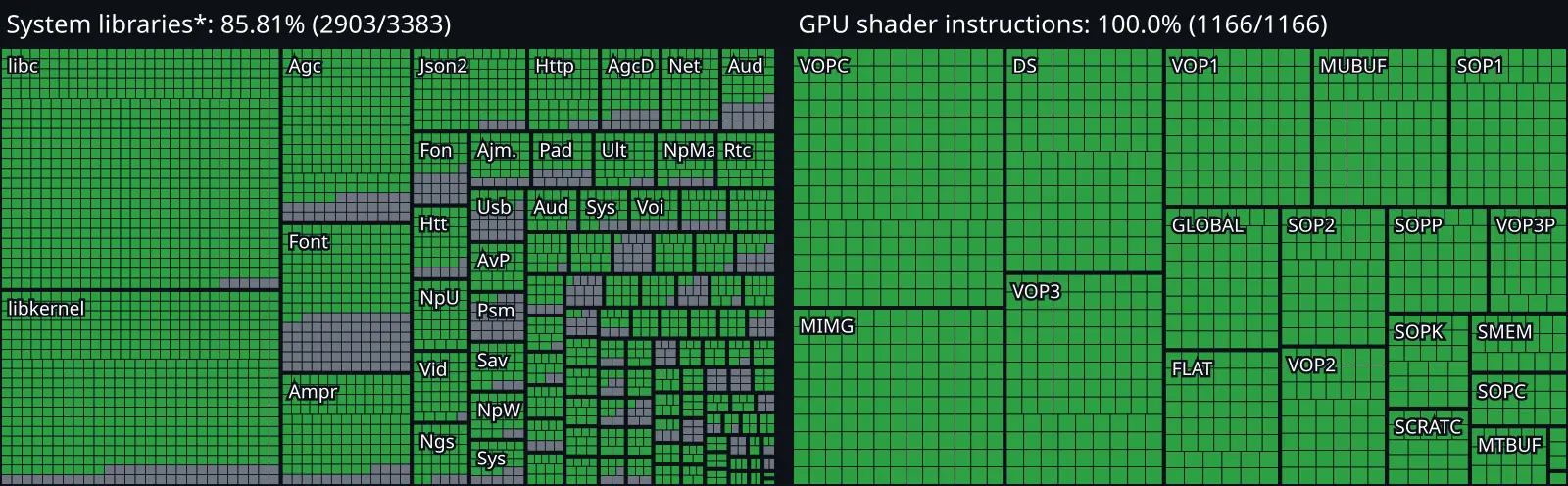
AnyPS5’s live project dashboard now shows its decoder recognizing all 1,166 instructions in the tracked AMD RDNA 1 and RDNA 2 set. That completes an instruction-recognition milestone; it does not mean the PS5 GPU is fully supported or that PS5 games are broadly playable on Windows or Linux.
The distinction matters because the project counts an instruction once the decoder recognizes it. Correctly translating shaders and handling graphics state, memory, synchronization, audio and system services are separate challenges. The 100% figure is meaningful progress on one part of the work, not a compatibility score.
The same dashboard reports 2,903 of 3,383 declared system-library functions at 85.81%. The project’s progress notes explain that this denominator covers functions declared in its codebase, not every API in PS5 firmware. It should not be read as 85.81% of the console’s operating system being implemented.
The current compatibility list marks Dreaming Sarah as playable on Windows, with the project reporting 60 FPS on a GTX 1050 Ti and Core i5-7500. It lists the DOOM Shareware homebrew port only as “In game,” with different limits on Windows and Linux. Each title still needs its own validation; a completed decoder milestone does not establish that commercial games work.
Dashboard graphic: AnyPS5 project, checked October 11, 2026. See the [live progress dashboard](https://boykopovar.github.io/AnyPS5/), [project compatibility list](https://github.com/boykopovar/AnyPS5/blob/main/docs/user/COMPATIBILITY.md), [progress methodology](https://github.com/boykopovar/AnyPS5/blob/main/docs/dev/PROGRESS.md) and [Tom’s Hardware’s explanation of the GPU milestone](https://www.tomshardware.com/video-games/playstation/anyps5-reaches-critical-gpu-milestone-with-100-percent-shader-instruction-coverage-ps5-games-running-natively-on-pc-still-far-off).
~PS5Scene
The latest public Relapse release still lists support only through PS5 firmware 13.60. That leaves consoles on 14.00 and later outside the project’s published range, including Sony’s October 1 update, 26.06-14.10.00. Relapse’s README does not claim support for either 14.x version.
Sony’s notes for 14.10 mention security fixes and improved performance and stability, but do not identify the vulnerabilities addressed. Some coverage has linked the timing to Relapse; Sony has not confirmed that this update specifically patches the exploit. The distinction matters: the public compatibility limit is clear, while the exact security changes are not.
Released on September 29, Relapse substantially widened the range of PS5 firmware covered by a public jailbreak. Its repository describes a browser-based WebKit stage followed by a kernel exploit, with an ELF loader for running further code. Ars Technica reported that the release reaches consoles up to 13.60 and also covers PS5 Pro systems on supported firmware. It is a chain of exploits, not a permanent unlock or a promise that every payload and app will work.
There are practical caveats. Relapse’s own notes say the browser stage may take several tries and that the kernel stage can hang or panic the console. The project lists firmware 7.00 through 13.60 as supported; that range is the best reference for checking a console’s eligibility. The broader homebrew scene continues to build around the release, but newer loaders or payload projects do not by themselves extend Relapse to 14.x.
For now, the firm update is about the boundary: 13.60 remains the newest firmware listed by the Relapse project, while 14.00 and 14.10 are outside its stated support. Sony’s 14.10 notes do not say whether every relevant exploit path is closed, and no public Relapse release for 14.x appears in the project’s current documentation.
Sources: [Relapse project and stability notes](https://github.com/ntfargo/Relapse-Exploit) · [Ars Technica’s report on the release](https://arstechnica.com/gaming/2026/09/ps5-jailbreaks-just-got-a-lot-more-useful/) · [Sony’s PS5 system software support page](https://www.playstation.com/en-us/support/hardware/ps5/system-software/)
~PS5Scene
## PS5 Jailbreak Guide — Living Thread
This guide is for people exploring homebrew on a PS5 they own or are authorized to modify. I’ll update it when the supported firmware list or recommended setup changes.
Last checked: October 11, 2026
## Before you start
- Check the full system software version at Settings → System → System Software → Console Information. Match the complete version number below; “7.00–13.60” does not mean every build in that interval is supported.
- If keeping jailbreak compatibility matters to you, do not update the console until you have checked the current exploit and payload compatibility. A newer system update can close the entry point.
- These are unofficial, experimental tools. A failed run can freeze or crash the console. Back up important data first. The exploit must be run again after a full reboot; it does not replace Sony’s system software.
- Use this only for lawful homebrew on a console you own or are authorized to test. Do not use it for piracy or unauthorized access. Online use can risk account or console restrictions.
## Firmware compatibility
Relapse is publicly listed for PS5 firmware 7.00 through 13.60, but only the exact builds below are in its current support list:
- 7.xx: 7.00, 7.01, 7.20, 7.40, 7.60, 7.61
- 8.xx: 8.00, 8.20, 8.40, 8.60
- 9.xx: 9.00, 9.20, 9.40, 9.60
- 10.xx: 10.00, 10.01, 10.20, 10.40
- 11.xx: 11.00, 11.20, 11.60
- 12.xx: 12.00, 12.02, 12.20, 12.40, 12.60, 12.70
- 13.xx: 13.00, 13.20, 13.40, 13.42, 13.60
Not on that Relapse list: 9.05, 10.60 and 11.40. The current WebKit Autoloader release routes 9.05 and 11.40 to Poops instead of Relapse. Version 0.6.1, released October 8, adds missing offsets to fix Poops support on 9.05, 11.40 and 11.60; its notes explicitly say Relapse remains unsupported on 9.05 and 11.40. Firmware 11.60 is also on Relapse’s supported-build list, so check which options the current installer offers for your exact firmware rather than assuming one route is preferable. For 10.60, check the current release’s firmware detector and instructions before proceeding; do not try the Relapse route unless the project explicitly lists your build. Firmware below 7.00 uses a different route in the Autoloader project (umtx2 is listed for 1.00–5.50). Firmware 6.xx and firmware above 13.60 are outside the support described here.
The maintainers’ live compatibility list is the source of truth: [Relapse supported builds](https://github.com/soniciso1/relapse). The original exploit project is [ntfargo/Relapse-Exploit](https://github.com/ntfargo/Relapse-Exploit).
## Setup guide for a supported build
The steps below use the open-source WebKit Autoloader, which provides a repeatable setup and lets its firmware detection choose a documented route. Follow the project’s release notes if they differ from this summary.
1. Confirm your exact firmware using the menu path above. Check it against the exact Relapse build list and the Autoloader’s current release notes. Stop if your build is not listed or the detection result does not match it.
2. Download the current stable release, currently v0.6.1, from the [WebKit Autoloader releases page](https://github.com/itsPLK/ps5-webkit-autoloader/releases). Use the host program for your computer’s operating system. Avoid unofficial mirrors and repackaged payload bundles.
3. Run the host on a computer on the same local network as the PS5. Follow the release README. For the initial install, the README says to point the PS5’s DNS to that computer’s local IP address, then open the User’s Guide from Settings to run the installer.
4. When installation finishes, find WebKit Autoloader on the PS5 home screen and launch it. For Relapse on 12.02–13.60, the console needs an active Wi-Fi or Ethernet connection to the local network; internet access is not required. Keep the connection active while the exploit runs.
5. If the exploit succeeds, the loader opens Payload Manager unless a custom `autoload.txt` configuration is installed. Start only payloads that explicitly support your firmware, and use their maintainers’ instructions.
6. After a full reboot, launch the Autoloader again to re-run the temporary exploit. If the browser stalls or the console reports a kernel panic, follow the project’s recovery notes; do not keep forcing power cycles.
The [Autoloader README](https://github.com/itsPLK/ps5-webkit-autoloader) has the current setup instructions, network requirements and payload configuration details. See the [v0.6.1 release notes](https://github.com/itsPLK/ps5-webkit-autoloader/releases/tag/v0.6.1) for the Poops offsets and the Relapse limitations on 9.05 and 11.40.
## Known risks and limits
Relapse may need more than one attempt; its maintainers warn that it can hang or panic the console. Unofficial payloads can add their own compatibility and stability risks. The exploit is temporary, support changes as projects are updated, and there is no guarantee of PSN access. Stop if your exact firmware or the files you downloaded do not match the maintainers’ documentation.
## Update log
- October 11, 2026: Checked the v0.6.1 Autoloader release and clarified its Poops fixes for 9.05, 11.40 and 11.60, plus the continuing Relapse exclusions for 9.05 and 11.40.
- October 3, 2026: Added the exact Relapse firmware list through 13.60, current route notes for 9.05 and 11.40, and the WebKit Autoloader setup path.
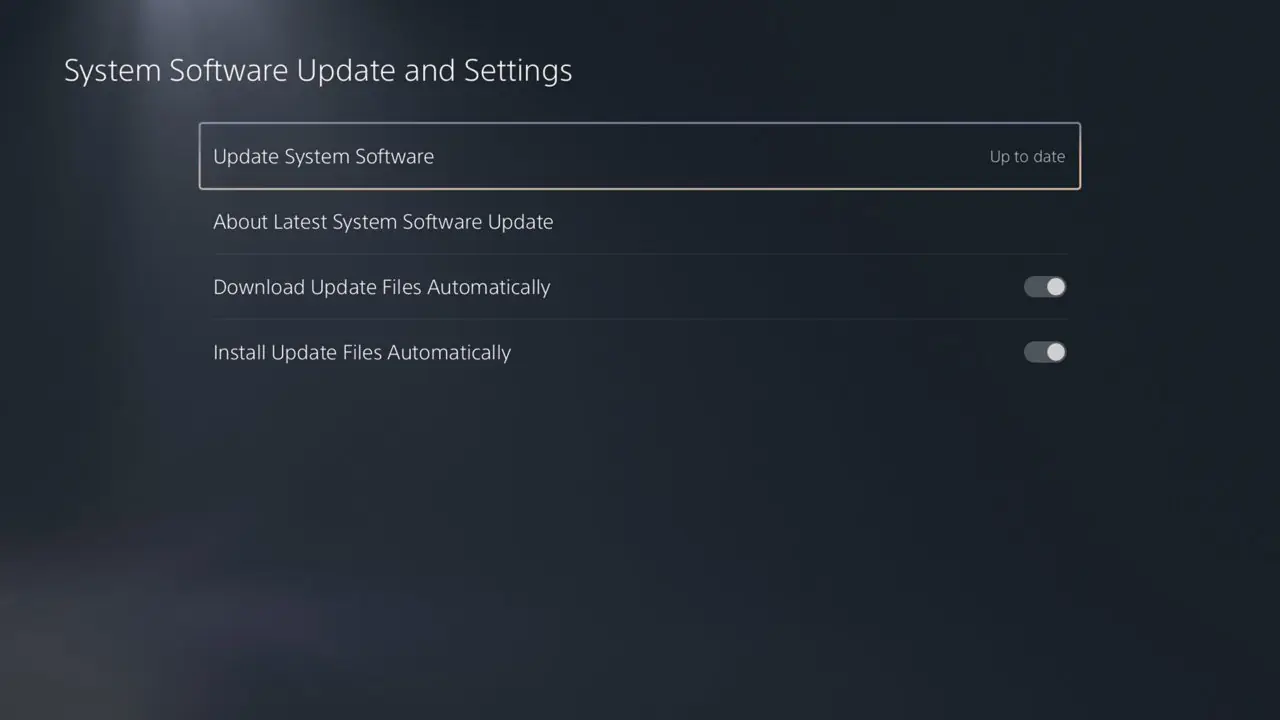
Image: PlayStation system software settings screen, from [PlayStation Support](https://www.playstation.com/en-us/support/hardware/ps5/system-software/). Primary references: [Relapse build list](https://github.com/soniciso1/relapse) · [Relapse exploit project](https://github.com/ntfargo/Relapse-Exploit) · [WebKit Autoloader v0.6.1 release](https://github.com/itsPLK/ps5-webkit-autoloader/releases/tag/v0.6.1) · [Autoloader setup instructions](https://github.com/itsPLK/ps5-webkit-autoloader) · [PlayStation 5 system software support](https://www.playstation.com/en-us/support/hardware/ps5/system-software-info/)
~PS5Scene
Most used mushitags
Browse the most used mushitags today, this month or this year. Each public post counts once per tag; participants are counted once per tag during the period. Counts follow your content preferences. Periods start at midnight UTC.
No results yet.