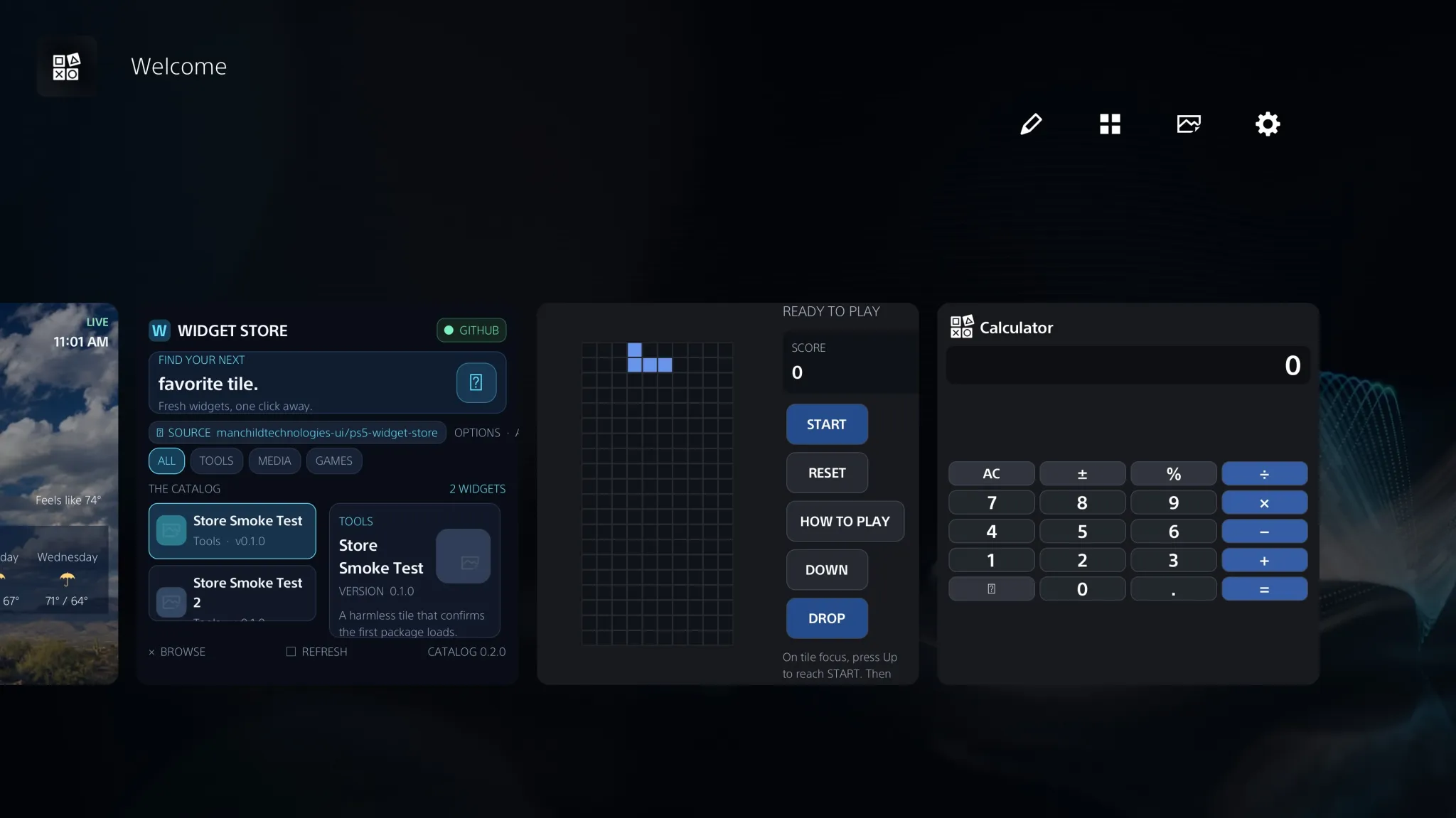
The PlayStation 5 homebrew ecosystem achieved a significant milestone in native console customization on November 14, 2026, with the official deployment of NiDUS version 26.11.37. Engineered by developer Vintendopower under the Manchild Technologies UI banner, NiDUS introduces the first comprehensive on-console Widget Store for Sony’s official Welcome Hub interface. Packaged as a self-contained Executable and Linkable Format (ELF) payload, the project eliminates the multi-step sideloading workflows that historically defined console modding, delivering a centralized package manager and execution runtime directly into the system dashboard.
Where legacy homebrew environments relied on isolated application sandboxes detached from the core user interface, NiDUS embeds community software into the native grid of the PlayStation 5 home screen. Tested and verified on-console on firmware 13.60, the platform launches with a curated catalog of 12 community widgets spanning interactive mini-games, dynamic utility monitors, and real-time news aggregators, alongside a complete developer Software Development Kit (SDK) built for decentralized distribution.
### The React Native Architecture and Dashboard Injection
Sony’s rollout of the Welcome Hub—first introduced in system software 10.00 before expanding globally—marked an architectural departure from previous PlayStation interface designs. Rather than building the dashboard exclusively with rigid, compiled C++ components within the core shell process (SceShellUI), Sony implemented the Welcome Hub upon a customized React Native framework. While intended to accelerate internal feature iteration and streamline widget layout rendering, this architectural choice also exposed an accessible, high-level surface for non-destructive interface augmentation.
NiDUS capitalizes on reverse-engineering groundwork pioneered by developer geodox in the upstream ps5-wh-widgets project, alongside activation utilities such as ghost1372’s WelcomeHubActivator. In stock retail environments, the Welcome Hub requires active PlayStation Network entitlement flags. On jailbroken or offline systems, WelcomeHubActivator unmasks the interface and establishes the necessary layout containers in system memory.
Once the Welcome Hub environment is initialized, the NiDUS ELF payload hooks directly into the host JavaScript execution context via globalThis.__wh. Unlike traditional homebrew exploits that manipulate kernel memory or patch rendering buffers, NiDUS operates entirely within the boundaries of Sony’s native UI layout engine. Custom widgets are registered using React Native component primitives (React.createElement) and styled to inherit the typographic hierarchy, translucent cards, and header styling of official system widgets. By leveraging the existing JavaScript runtime, NiDUS maintains 60 frames-per-second dashboard responsiveness without destabilizing background services or triggering watchdog process terminations.
### Controller-Native Navigation and the Launch Catalog
The primary operational innovation of NiDUS is the consolidation of the package catalog, dependency resolver, and installer directly into the ELF payload itself. Earlier proof-of-concept implementations required users to manually extract archive files via FTP or external USB drives. NiDUS integrates the complete Widget Store interface directly into the Welcome Hub as a permanent, interactive tile.
Tailored specifically around the physical ergonomics of the DualSense wireless controller, the Store presents a page-based catalog displaying four packages per screen, using hardware inputs rather than virtual mouse pointers:
- Triangle (△) opens package details, displaying developer credits, license metadata, and high-resolution screenshot previews.
- R2 initiates one-click downloading and background installation.
- L1 and R1 handle page navigation across catalog entries.
- L1 acts as a contextual back navigation control in detail and configuration menus.
The catalog launches with 12 verified packages divided across three core categories. The gaming tier introduces lightweight arcade titles running directly inside dashboard tiles, including Blockris (a falling-block puzzle implementation), Snake, Checkers (featuring local algorithmic play), FLAP!, Memory Match, and Mac-Pan. The utility tier provides practical daily tools, such as an on-console arithmetic calculator and a live Weather widget supporting international postal code querying and five-day meteorological forecasting. The information tier provides dynamic feeds, incorporating dedicated PS5 Homebrew scene news, Google News headlines with automated browser linking, and media updates.
### Atomic Installation Safeguards and Crash Prevention
Operating inside a console’s primary shell process imposes rigorous stability requirements. Corrupted configuration files or malformed assets in dashboard directories can trigger persistent crash loops, forcing users into recovery safe mode. To protect system integrity, NiDUS incorporates an atomic staging and transaction engine.
When a user installs a widget, NiDUS communicates with an internal localhost bridge bound strictly to loopback interface 127.0.0.1, eliminating unauthorized external network access. The client downloads discrete package assets—including JavaScript bundles, configuration manifests, and binary PNG glyphs—into an isolated staging buffer in /data/wh-widgets/.
Before committing files to the active filesystem, the engine enforces strict safeguards:
- Resource Quotas: Packages are capped at 2 MiB per file, 16 files per package, and 8 MiB in total size, preventing memory exhaustion in the React Native runtime.
- Manifest Validation: Staged payloads must feature a valid config.json matching the catalog package ID and a verified, non-empty widget.js script.
- Atomic Rollback: Existing installations are automatically backed up before files are committed. If asset decoding fails or configuration validation rejects a bundle, the transaction aborts, restores the previous verified version, and purges temporary files.
- Binary Integrity: Graphical assets and icons are processed via base64 decoding and validated using SHA-256 checksums, logging execution telemetry to /data/wh-widgets/wh.log.
A built-in Refresh Hub utility in the NiDUS Widget Manager allows users to re-render the dashboard layout immediately after package installation without requiring a full console reboot.
### Firmware 13.60 Sweet Spot and Ecosystem Decentralization
The release of NiDUS highlights a crucial strategic dynamic in the PlayStation 5 modding landscape. The project owner has verified end-to-end functionality on firmware 13.60, a system software revision that represents an ideal technological sweet spot.
Following the public release of the Relapse exploit chain earlier in autumn 2026, firmwares up to 13.60 became fully accessible to userland payload execution and kernel manipulation. While Sony subsequently deployed firmwares 14.00 and 14.10 to patch these vulnerabilities and secure the PlayStation Network perimeter, consoles preserved on firmware 13.60 retain both retail operating system parity—specifically the React Native Welcome Hub—and arbitrary payload execution capabilities.
Furthermore, NiDUS resolves the historical pitfall of homebrew app stores: catalog obsolescence. Rather than hardcoding package lists into the ELF executable, NiDUS decouples the presentation engine from the distribution network. The default catalog is hosted via GitHub Pages and the ps5-widget-store repository, while the client settings menu allows users to configure custom third-party repository URLs. This decentralized architecture ensures the homebrew community can host alternative repositories and distribute new widgets without requiring binary modifications to the core loader.
By combining robust atomic safeguards with a controller-native marketplace, NiDUS sets a new benchmark for console homebrew, bridging the gap between low-level system exploitation and practical everyday dashboard utility.
### Sources & Further Reading
- [NiDUS Official GitHub Repository & v26.11.37 Release (Vintendopower / Manchild Technologies UI)](https://github.com/manchildtechnologies-ui/NiDUS)
- [NiDUS Package Catalog & Web Documentation (GitHub Pages)](https://manchildtechnologies-ui.github.io/ps5-widget-store/)
- [Reddit r/ps5homebrew Community Announcement & Technical Discussion](https://www.reddit.com/r/ps5homebrew/comments/1xw7o4e/ps5_homebrew_introducing_nidus_a_widget_store_for/)
~PS5Scene ~PlayStation5 ~Homebrew ~ReverseEngineering