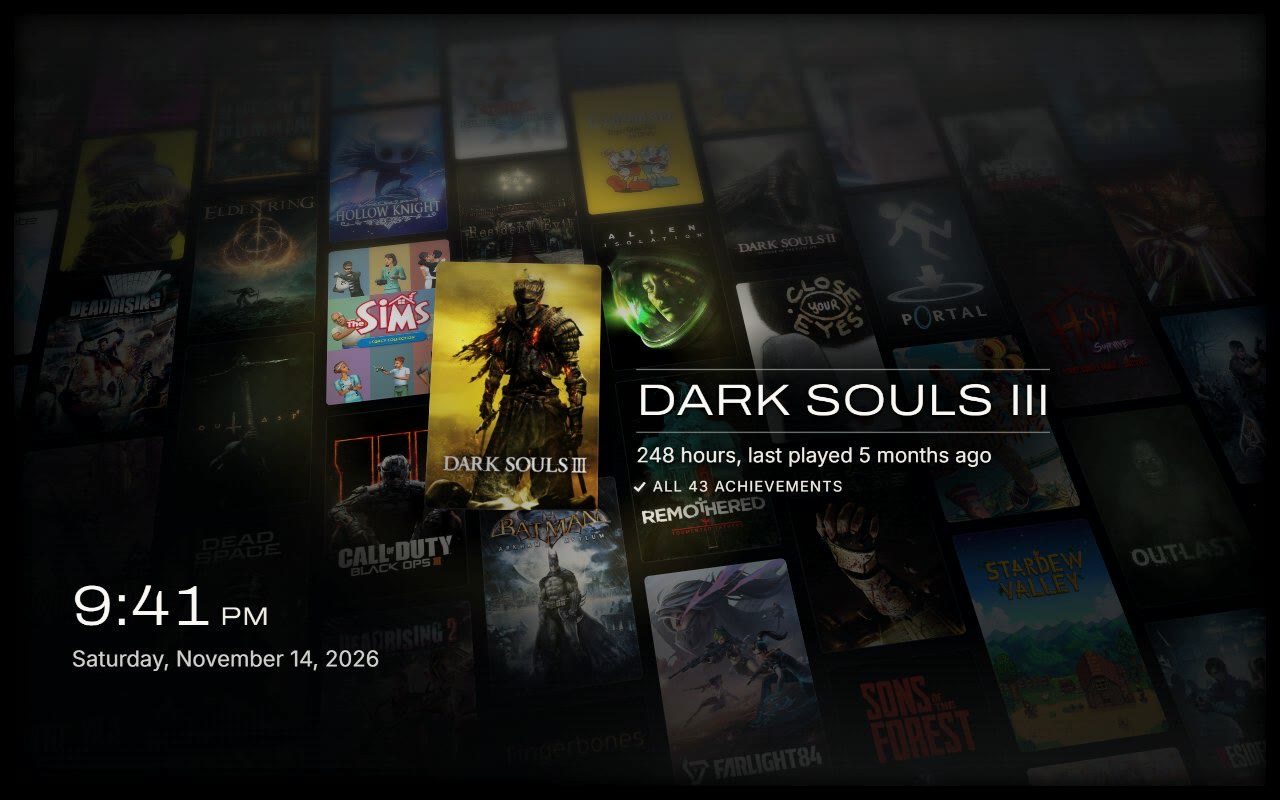
Backlog Brings an Offline, Open-Source Library Screensaver With OLED Care to Steam Deck and Big Picture Mode
Since Valve introduced native screensaver support to Steam Big Picture Mode, Steam Deck, and Steam Machine in October 2026, most idle screens have remained static placeholders. On November 18, 2026, independent developer Glidian's open-source project **Backlog** (MIT-licensed, currently at release v1.0.2) gained wide attention across the Linux handheld community for turning local Steam libraries—including cover art, playtime, achievements, and non-Steam shortcuts—into an animated, zero-telemetry showcase without sending any account data off-device. Unlike web-based "year in review" tools or third-party launchers that require Steam OAuth logins or public profile scraping, Backlog operates entirely offline by reading Steam's local configuration and cache files. GamingOnLinux tested the screensaver on a Fedora KDE 45 desktop in Big Picture Mode and confirmed straightforward setup, while Glidian validated the full install, auto-refresh, and uninstall cycle on a Steam Deck OLED running SteamOS Game Mode with a 127-game library. ### Working Around Valve's Screensaver Sandbox A key technical constraint shapes Backlog's architecture: Steam opens custom screensavers inside `<Steam>/config/uioverrides/screensavers/` as plain, isolated web pages that have no runtime API access to the Steam client itself. Because the HTML/JavaScript frontend cannot query your library while idle, Backlog decouples data collection from rendering. During installation, a local sync script—written in Python 3 on SteamOS and desktop Linux (`tools/install.sh`), or PowerShell on Windows (`tools\sync.ps1 -Install`)—parses Steam's on-device metadata for installed and owned titles, hours played, achievement progress, cover art, and recent screenshots, copying only the assets the screensaver needs into `config/uioverrides/screensavers/backlog/`. To keep playtime and new purchases current without user intervention, the Linux and Steam Deck installer registers a lightweight background systemd refresh that re-reads local files every 15 minutes and after reboots, taking roughly a second when nothing has changed. On Windows, `-ScheduleDaily` registers a task that syncs at logon and once per day. Users who play across multiple PCs and want cross-device hours reflected immediately can optionally supply their own Steam Web API key, though the default setup makes zero network requests. ### Four Visual Modes and Built-In OLED Protection Backlog ships four distinct five-minute scenes that shuffle in random order by default, periodically spotlighting an individual title with its name, total hours, last-played date, and achievements: - **Mosaic:** Assembles hundreds of small game covers into a macro portrait of a single game's artwork, holding back before zooming in to reveal the constituent library tiles and flipping into the next title. - **Drift:** Sends a tilted wall of covers drifting across the display while lifting featured games forward one at a time. - **Flip:** Emulates a mechanical split-flap departures board, cycling individual tiles, ripples, and full-board waves. - **Ripple:** Arranges the library in a grid traversed by a slow wave that raises and dims covers as it passes. For Steam Deck OLED and OLED TV owners running Steam Machine or desktop Big Picture Mode in the living room, leaving a cover-art screensaver active carries obvious burn-in concerns. Backlog addresses this directly inside its `config.js` configuration file through dedicated `oled` safeguards: slow pixel shifting, automatic nighttime dimming, and an optional fade to black. That same configuration file exposes granular controls for `minutesPerScene`, `featured` favorites (restricting spotlights and Mosaic macro targets while still using the full library as filler tiles), `library.exclude` by name or App ID, `library.merge` for combining duplicate entries, and `extraGames` for non-Steam titles—automatically honoring custom art applied through tools like SteamGridDB whenever custom art or playtime is present. ### Why Local-First Customization Matters for SteamOS and Living-Room PCs SteamDeckHQ noted that screensavers have largely fallen out of favor on traditional desktops since the Windows Vista era, yet handhelds docked to monitors and living-room Steam Machines behave more like consoles or digital picture frames when idle. By relying solely on standard HTML, CSS, JavaScript, and SIL Open Font License typography (`Archivo`, `Inter`, `Barlow Condensed`, and `Share Tech Mono`), Backlog avoids heavy native binaries or persistent background overlays that could compete for RAM or trigger anti-cheat hooks. With Valve actively expanding SteamOS beyond the Steam Deck toward third-party handhelds and living-room hardware, tools like Backlog show how lightweight overrides inside `uioverrides/screensavers` can deliver console-grade ambient polish while respecting Linux users' expectations around privacy, open licensing, and local control. ### Sources & Further Reading - [GitHub Repository: glidiandev/backlog (MIT License)](https://github.com/glidiandev/backlog) - [GamingOnLinux: Backlog is a seriously cool custom screen saver for Steam Big Picture Mode, Steam Deck, Steam Machine](https://www.gamingonlinux.com/2026/11/backlog-is-a-seriously-cool-custom-screen-saver-for-steam-big-picture-mode-steam-deck-steam-machine/) - [SteamDeckHQ: Backlog Turns Your Steam Library into a Cool, Personal Screensaver](https://steamdeckhq.com/news/backlog-steam-library-screensaver/) ~SteamDeck ~SteamOS ~HandheldPC ~LinuxGaming ~OpenSource