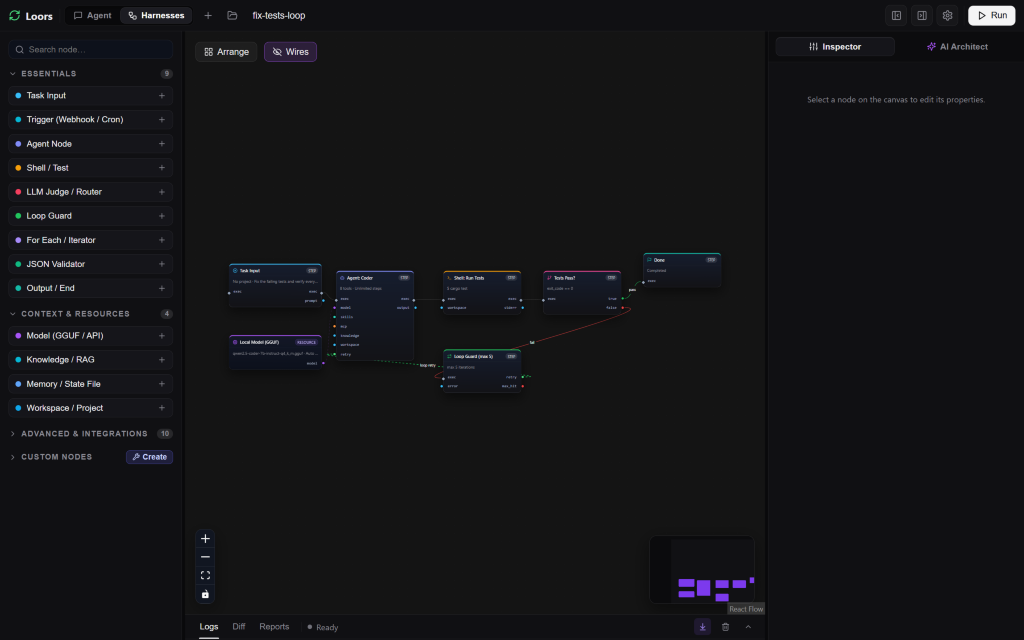
Loors v0.1.3: An Open-Source, 4.4 MB Rust Local-First AI Agent and Visual Cyclic Workflow Studio Powered by Embedded llama.cpp
Most AI coding and workflow tools today force developers into an awkward compromise: either surrender source code and telemetry to cloud-locked subscriptions, or cobble together fragile Python scripts and multi-hundred-megabyte Electron wrappers just to run local models. [Loors](https://loors.dev/)—an open-source (MIT) desktop studio and headless server built in Rust and Tauri v2 by developer Ion Alfaro—takes a radically different approach. Shipping as a roughly 4.4 MB native application for Windows, macOS, and Linux (with version v0.1.3 just released on November 26, 2026), Loors combines an autonomous coding and research agent, a Visual Cyclic Harness Studio, a shared interactive browser, and a standalone CLI server inside one local-first workspace. Rather than treating AI assistance as a disposable chat window, Loors is engineered around a core reality of software engineering: useful agent work is iterative, verifiable, and repeatable. Whether you want to run 100 percent offline on your own GPU using local GGUF models or orchestrate frontier cloud APIs across automated CI/CD pipelines, Loors keeps the entire runtime, workflow graph, and execution history under your direct control. ### Beyond Linear Prompts: The Visual Cyclic Harness Studio Traditional node-based automation tools excel at linear pipelines—trigger A, call LLM B, send webhook C—but break down when an AI agent needs to write code, execute unit tests, inspect failures, and loop back to fix its own mistakes. Loors’ flagship Visual Cyclic Harness Studio is built specifically for self-correcting multi-agent loops. On a visual canvas, developers can wire together modular building blocks—including Agent nodes, Shell and Test runners, LLM Judges, JSON Validators, Loop Guards, Human Approval gates, Git Checkpoints, For-Each iterators, Parallel Fan-Out branches, Knowledge/RAG retrieval, and Webhooks, Cron, or Telegram triggers. A classic coding harness flows naturally from Agent Coder to Run Tests, into an LLM Judge, and back through a Loop Guard until tests pass cleanly. With multi-harness tabs and concurrent execution, you can inspect every step live while running multiple independent workflows in parallel. For rapid prototyping, a built-in AI Architect lets you describe what you want to automate in plain English and generates or refactors complete workflow graphs directly from your project context. ### 100 Percent Local GGUF Privacy or Any Cloud Model Vendor lock-in is one of the fastest-growing pain points in agentic tooling. Loors sidesteps it completely by offering first-class local and cloud inference side by side. For fully private, offline setups, Loors includes one-click installation of an embedded llama.cpp GPU runtime supporting CUDA, Vulkan, Metal, and CPU execution, paired with a built-in Hugging Face GGUF model explorer so you can download and run local open-weight models without touching terminal flags. When a task calls for frontier cloud reasoning or hybrid routing, Loors natively connects to OpenAI / ChatGPT, Anthropic Claude, Google Gemini, GitHub Models / Copilot, OpenRouter, Ollama, LM Studio, and any custom OpenAI- or Anthropic-compatible endpoint—alongside full Model Context Protocol (MCP) server support for plugging in external developer tools. ### Shared Interactive Browser and Granular Safety Controls In interactive Agent Mode, Loors pairs a distraction-free workspace with live Git diffs, parallel subagents, and four explicit safety levels ranging from strict read-only code review to full autonomous execution. One of its standout practical features is a shared interactive browser powered by Chrome DevTools Protocol (CDP). Instead of watching a headless bot fail endlessly on login walls, CAPTCHAs, or authenticated internal dashboards, you browse side by side with your agent inside the same embedded window: sign in manually, open a documentation portal or staging app, and hand control straight back to the agent on the exact same page. ### From Your Laptop to Any Server With loors-cli Visual workflows often die on a developer’s laptop because they cannot be deployed cleanly to production servers or CI runners. Loors solves this by shipping loors-cli, a standalone Rust binary that shares 100 percent of the desktop engine. Using loors-cli run, teams can execute any exported .loors.json cyclic workflow inside GitHub Actions, cron jobs, or shell pipelines with structured logs and clean CI exit codes (0 for success, 1 for failure, 2 for budget reached). Meanwhile, loors-cli serve turns any VPS or homelab machine into a self-hosted Loors Web Panel with Bearer token authentication, REST endpoints (/api/health, /api/workflows, /api/runs), and live Server-Sent Events (SSE) streaming. ### Getting Started With Loors v0.1.3 Loors v0.1.3 is completely free, open source under the MIT license, and available now with native installers for Windows (.exe and .msi), macOS (.dmg), and Linux (.AppImage and .deb). Developers looking to move beyond fragile prompt wrappers into visual, self-healing local AI workflows can download the latest release directly from the official site or explore the Rust source code on GitHub. ### Sources & Further Reading - [Loors Official Website & Downloads (loors.dev)](https://loors.dev/) - [GitHub: IonAlfaro / Loors Official Repository](https://github.com/IonAlfaro/loors) - [GitHub Releases: Loors v0.1.3 Native Installers](https://github.com/IonAlfaro/loors/releases/tag/v0.1.3) ~ArtificialIntelligence ~OpenSource ~LocalLLM ~AIAgents ~Rust